


Notification channels
Alerts and reports send their messages to channels: a Slack channel, a Discord channel, a Teams channel, PagerDuty, a Prometheus Alertmanager, or any webhook. A message leaves quanthea when it is sent, so only admins add and change channels, in Settings → Notifications.
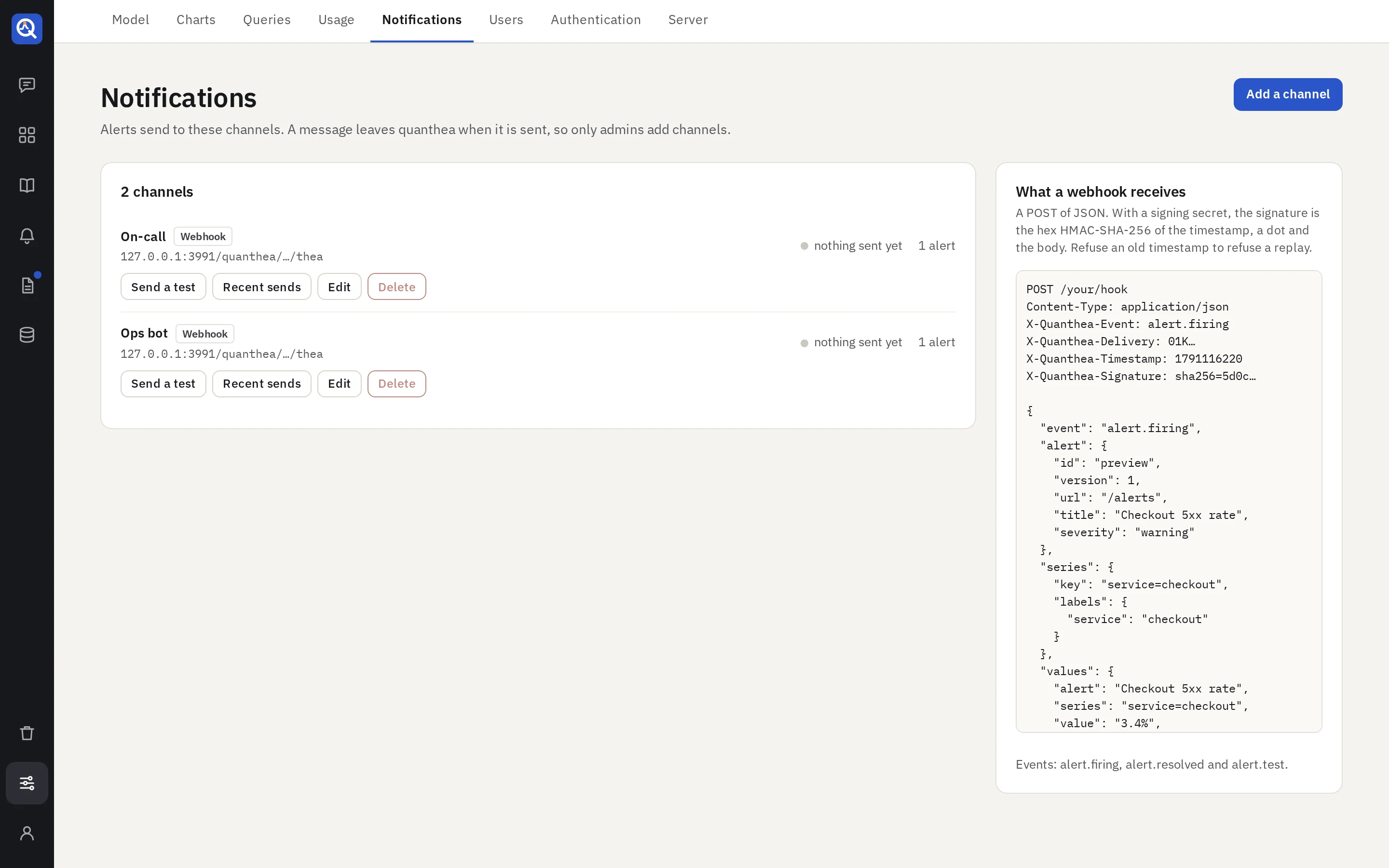
Add a channel
Add a channel, name it (“On-call”, “#sales”), pick its kind and paste its target:
| Kind | Target |
|---|---|
| Slack | An incoming webhook URL |
| Discord | A channel webhook URL |
| Teams | A Workflows webhook URL |
| PagerDuty | An Events API v2 routing key |
| Alertmanager | Its base URL, such as http://alertmanager:9093 |
| Webhook | Any URL; plain http too, for a receiver on your own network |
Then Send a test. The target is sealed and only ever shown masked.
- Mentions, for Slack and Discord: who to ping when an alert starts firing, a report fails or
an alert can’t be checked, such as
<!here>or a role. Mentions never come from the data. - Signing secret, for a webhook: each request is then signed, so your receiver can check it came from quanthea. The page shows what a webhook receives, headers and body.
- Credentials, for an Alertmanager: a user name and password, or a bearer token, when yours asks for them. They are sealed with the target and never shown again.
What each service gets
- Slack: a message with a bar coloured by state, the fields, and an “Open in quanthea” button.
- Discord: an embed with the fields and a link.
- Teams: an Adaptive Card with the fields and an “Open in quanthea” action.
- PagerDuty: an incident that opens when an alert fires and resolves when it stops. A report pages no one when it is ready; a report that fails opens a warning, which the next good run closes.
- Alertmanager: an alert that fires and ends with yours, which Alertmanager groups, routes and silences by its labels. See Alertmanager.
- Webhook: the notification as JSON.
Text from your data is escaped for each service, so it never becomes a link, a mention or formatting.
Each channel
- Recent sends: every message, whether it got through, and the HTTP status.
- Edit: an empty target or secret keeps the stored one.
- Delete: asked twice, and refused while an alert or a report sends to it.
A failed send is retried twice; quanthea honours a short Retry-After. The log keeps 30 days.
Alertmanager
An Alertmanager channel posts to the v2 API of your Alertmanager (/api/v2/alerts under the base
URL, route prefix included). Plain http is allowed, for an Alertmanager on your own network.
Each series of an alert is one alert in Alertmanager, told apart by its labels:
| Label | Value |
|---|---|
alertname | The alert’s title |
severity | critical, warning or info |
quanthea_alert | The alert’s id, the same across versions and renames |
| the series’ own | Such as service="checkout", one per label of the row |
- Label names are made valid for Prometheus: every character but letters, digits and
_becomes_, and a name starting with a digit gets a_in front. - A series label named
alertname,severityorquanthea_…is sent asseries_alertnameand so on. Two labels that end up with the same name are numbered:a_b,a_b_2. - Annotations:
summaryis the message’s title,descriptionits body and fields,valuethe value. - The link back to the alert is the alert’s
generatorURL. It needspublicUrlin the configuration. - Resolved: the alert is sent again with its end, so Alertmanager resolves it at once.
How an alert stays firing
Alertmanager ends an alert it has not heard about for a while. So quanthea tells it again at every check that a series still fires, and each time says that the alert holds for four checks more.
- An alert needs no repeat to stay firing in Alertmanager. A repeat is for the channels a person
reads, and Alertmanager repeats to its own receivers by its own
repeat_interval. - A few late or lost checks do not end the alert. When quanthea stops, Alertmanager ends the alert four checks later: after 4 minutes for an alert checked every minute.
- Only an Alertmanager channel hears this. A chat or a webhook gets the messages it always got, and the channel’s latest messages do not list it.
Quiet hours, mutes and silences
Quiet hours and mutes of quanthea hold a message back before it reaches Alertmanager. Silences, inhibitions and time intervals of Alertmanager hold back what Alertmanager sends on.
- During quiet hours or a mute quanthea stops telling Alertmanager that a series still fires, so Alertmanager ends the alert when its hold runs out, and fires it again once they are over.
- To keep an alert firing in Alertmanager while nobody is told, leave the alert without quiet hours and silence it in Alertmanager.
What else it sends
- An alert that cannot be checked is an alert of its own, with the labels
alertname,severity,quanthea_alertandquanthea_check="failed". It stays firing as a series does, until the alert can be checked again. - A report fires nothing when it is ready. A run that fails fires a
warningwith the labelsalertname(the report’s title) andquanthea_report(its id). It holds for a day, or until the next good run ends it. - Send a test fires an alert marked
quanthea_test="true", which ends by itself after 5 minutes. Route or silence that label if a test must page no one.
Without a channel
An alert still fires on its page and a report still runs; nothing is sent. The agent tells you an admin can add a channel here.